Key takeaways
- You own an original PS5 or Slim and want zero risk: official Sony covers.
- You want the matte-black look and can pick the right generation: dbrand Darkplates 2.0.
- Budget under $40 and you want the controller to match: a molded ABS kit, with 30–40 minutes set aside for the controller shell.
- You rent, resell, or the console is still in warranty: keep the original panels in the box — they are the first thing a buyer asks about.
For most PS5 owners the best faceplates are Sony’s own official console covers: they are the only panels guaranteed to match your console’s exact vent slots and clip positions, and their colour names line up one-to-one with DualSense controllers. If you want a matte, logo-free look and own an original PS5 or a PS5 Slim, dbrand’s Darkplates 2.0 are the strongest aftermarket option. Budget builders should look at molded ABS kits from brands such as eXtremeRate — roughly half the price, but with far more variation in thickness, finish and fit.
Our top picks


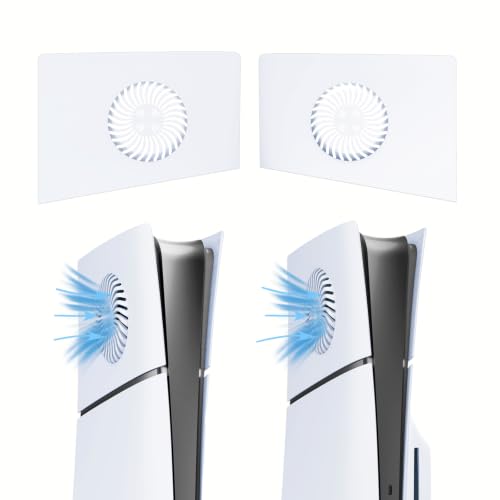
As an Amazon Associate we earn from qualifying purchases at no extra cost to you. Ratings are shown as listed on Amazon.
Quick comparison: the picks at a glance
| Pick | Best for | Key specs | Typical price |
|---|---|---|---|
| Sony official console covers | Most owners — guaranteed fit and vent geometry | Molded ABS, tool-free clip-on, separate SKUs for original PS5 disc, original PS5 digital and PS5 Slim; colours shared with DualSense | $50–65 per pair |
| dbrand Darkplates 2.0 | Matte, logo-free minimalist look | Two-piece clip-on panels, micro-textured matte finish, redesigned silhouette; versions for original PS5 and PS5 Slim | $60–80 |
| eXtremeRate-style molded ABS kits | Budget builds and a truly matched controller | 1.8–2.5 mm molded ABS, glossy or matte, matching DualSense faceplate available in the same colourway | $25–45 |
| Generic glossy “piano black” plates | Show builds that rarely get handled | High-gloss ABS, often 1.2–1.8 mm, frequently blanks part of the side intake slots | $20–35 |
Best overall: Sony official console covers
Sony’s covers are the reference point because they are made from the same tooling geometry as the panels that ship on the console. Per Sony’s product pages, they are sold in separate SKUs for the original PS5 disc edition, the original PS5 digital edition and the PS5 Slim, and the colour families — Midnight Black, Cosmic Red, Nova Pink, Galactic Purple, Starlight Blue, plus the Deep Earth range in Volcanic Red, Cobalt Blue and Sterling Silver — are shared with DualSense controllers. Matching a controller is therefore a matter of buying the same colour name, not hunting for a close match.
Who it suits: anyone who wants the console to look different without thinking about fit, airflow or resale. Main trade-off: the highest price per pair and the narrowest design range — every official cover is a smooth, stock-silhouette panel, so there are no vented or sculpted “performance” looks.
Best for a matte, logo-free look: dbrand Darkplates 2.0
dbrand’s plates are what most people picture when they say “custom PS5”. Buy the 2.0 generation specifically: after Sony filed a design complaint in 2021 over the silhouette of the original Darkplates, dbrand reworked the panels so they no longer mimic the PlayStation logo cut-out. The finish is a micro-textured matte that hides fingerprints far better than the console’s stock glossy panels, and it is the finish most resistant to visible scratching in this category.
Who it suits: owners of an original PS5 or PS5 Slim who want the console to read as a plain black box on a shelf. Main trade-off: version fragmentation — you must select the correct generation at checkout, and the textured surface traps dust in a way smooth plastic does not, so it needs a soft brush rather than a wipe.
Best budget, and the only realistic route to a matched controller: molded ABS kits
Third-party kits in the $25–45 band are where most buyers end up, and the variance between them is enormous. The good ones are molded ABS in the 1.8–2.5 mm range with internal ribs and a full set of clip tabs matching the OEM count. The bad ones are thinner, glossier and lighter, and they show it within a month — flex when you grip the console, a buzz at certain fan speeds, and hairline cracks at the tabs after two or three removals.
The genuine advantage of this route is controller matching. Brands such as eXtremeRate sell replacement DualSense faceplates and full controller shells in the same colourways as their console panels, which is the only way to get a genuinely matched console-and-controller set in a colour Sony does not offer. The cost is labour and risk: a DualSense shell swap is a 20–40 minute teardown with several small screws and delicate ribbon cables for the touchpad and battery, and a pinched cable is an easy mistake to make on a first attempt.
Which PS5 do you actually have?
Faceplates are not interchangeable across generations, and the original PS5’s disc and digital versions do not even share panels with each other — the disc model’s right-hand panel bulges to clear the drive, a 12 mm difference in overall width.
| Console | Launched | Dimensions (H × W × D) | Panel layout | What fits |
|---|---|---|---|---|
| PS5 (original, disc) | 2020 | 390 × 104 × 260 mm | Two side panels; right panel bulges for the drive | Original disc-edition covers only |
| PS5 (original, digital) | 2020 | 390 × 92 × 260 mm | Two flat side panels | Original digital-edition covers only |
| PS5 Slim | 2023 | 358 × 96 × 216 mm | Smaller panels plus a separate cover for the detachable disc drive | Slim-specific covers only |
| PS5 Pro | 2024 | 388 × 89 × 216 mm | Pro-specific panel geometry | Pro-labelled covers only |
If a listing does not name your exact model — “PS5 Pro” rather than “PS5”, “Slim” rather than “standard” — treat it as incompatible until the seller confirms otherwise.
The numbers that separate a good panel from a bad one
| Spec | Target | What goes wrong outside it |
|---|---|---|
| Panel thickness | 1.8–2.5 mm molded ABS with internal ribs | Under roughly 1.5 mm the panel flexes, buzzes at high fan speeds and cracks at the clip tabs |
| Surface hardness | 2H–3H pencil hardness on a hard-coated matte | Bare glossy ABS sits nearer HB and shows micro-scratches within weeks |
| Vent slot area | 100% of the original side intakes retained | Blanked intakes starve the fan; the console runs warmer and louder for no benefit |
| Panel weight | Roughly 200–500 g for the pair | Much lighter usually means thinner walls; much heavier often means filler-loaded plastic that chips |
| Clearance once fitted | At least 100 mm (4 in) on the sides and rear | The PS5 draws intake air through the side panels, so a tight shelf defeats the design |
| Install time | 1–3 min for OEM-style clips; 20–40 min for a controller shell | Panels that need screws or trim removal are the ones that end up with gaps and rattle |
Run those six checks against a listing and the decision usually makes itself:
- You own an original PS5 or Slim and want zero risk: official Sony covers.
- You want the matte-black look and can pick the right generation: dbrand Darkplates 2.0.
- Budget under $40 and you want the controller to match: a molded ABS kit, with 30–40 minutes set aside for the controller shell.
- You rent, resell, or the console is still in warranty: keep the original panels in the box — they are the first thing a buyer asks about.
Fitting them: two minutes for the console, forty for the controller
- Unplug the console and leave it 10 minutes. The rear exhaust and power supply area stay warm, and you will be tilting and gripping the console while you work.
- Lay it flat on a towel with the logo face down. The panels release with a slide-and-lift motion; a soft surface stops the glossy edge from scuffing on the table.
- Slide the panel toward the base of the console, then lift. Sliding first releases the internal hooks — pulling straight up is what snaps tabs.
- Keep the originals. They protect your resale value and let you return the console to stock before any warranty service.
- Hook the new panel’s tabs in, then slide it back until it clicks. If it needs force, a tab is misaligned; forcing it will crack the clip rather than seat it.
- Check the side intake slots line up with the console’s internal channels before you power on — this is the single most common installation mistake with cheap panels.
- For a matching controller, work slowly around the ribbon cables. Undo the small screws in the grip area, release the back shell clips, and lift the shell straight off rather than levering it, which is how touchpad and battery cables get pinched.
What wears first, and how to keep the finish
The clip tabs are the first failure point on any faceplate, because they absorb all the stress of removal and refitting. Treat panels as a fit-once part: if you swap between two sets, expect the tabs to loosen within a dozen cycles. After that, glossy surfaces show micro-scratches first, and soft-touch matte finishes show shiny patches where hands rest during a move.
Clean panels with a microfibre cloth and lukewarm water with a drop of dish soap. Avoid alcohol, ammonia-based glass cleaners and abrasive pads on soft-touch coatings — they haze the surface permanently. White and light-coloured ABS will also drift yellow under prolonged direct sunlight, so a console sitting in a bright window is the one case where a darker colour ages visibly better. There are no consumables to replace, but a spare set of adhesive feet or pads is worth keeping if your stand uses them.
Frequently Asked Questions
Do third-party PS5 faceplates void the warranty?
A console warranty covers manufacturing defects, and damage caused by a non-original accessory is not covered. In the United States, consumer law prevents a warranty from being voided simply because you used third-party parts, but you would still be responsible for proving a fault was not caused by them. Keeping the original panels and refitting them before any service call is the simplest way to avoid the argument.
Will PS5 Slim covers fit an original PS5?
No. The Slim is smaller overall (358 × 96 × 216 mm against 390 × 104 × 260 mm) and uses a different panel layout that includes a separate cover for the detachable disc drive. Covers are sold by generation, and the same applies to the PS5 Pro, which has its own geometry again.
Do custom faceplates make a PS5 run hotter?
Only if they change the airflow. The PS5 draws intake air through the side panels, so a replacement that preserves the original slot area will perform the same as stock. Panels that blank or narrow those slots restrict intake, which raises internal temperatures and makes the fan work harder and louder.
Can I just paint the stock faceplates instead of buying new ones?
You can, and it is the cheapest route to a one-off colour. Use a plastic-safe primer and a flexible paint, sand lightly between coats, and allow 24–48 hours to cure fully before refitting. Two cautions: sanding the texture off a thin panel weakens it, and paint must never bridge the vent slots, because that is exactly where airflow is lost.
How do I get a faceplate that matches my DualSense exactly?
The reliable path is colour names rather than colour matching — Sony shares its palette between console covers and DualSense controllers, so buying the same named colour in both gets an exact match. Outside that palette, matching means a third-party kit that also sells a DualSense faceplate or shell in the same colourway, which requires opening the controller.
How do I remove PS5 faceplates without breaking them?
Lay the console flat with the logo face down, grip the panel near the top corner, and slide it toward the base of the console before lifting. The slide releases the internal hooks; lifting first is what cracks tabs. If a panel resists, check that every clip has released rather than increasing the force.