Key takeaways
- Compare the best laptops for travel photographers: light laptops with colour-accurate screens, strong batteries and fast storage for editing on the road.
A travel photographer asks two things of a laptop that rarely sit together: it has to be light enough to carry all day, and its screen has to show colour accurately enough to edit with confidence. A heavy laptop stays in the hotel room, and a washed-out screen means edits made on the road look wrong back home. The four laptops in this guide balance weight, screen quality, battery life and storage, so the machine earns its place in the camera bag rather than weighing it down.
This guide is for photographers who edit on the road, for travellers who cull and back up thousands of raw files each evening, and for anyone who needs a laptop that survives airports, buses and mountain trails. Every laptop below was chosen from the names and specifications stated on its Amazon product page, so the weights, screens and battery figures come from the listing itself.
Quick Picks
As an Amazon Associate we earn from qualifying purchases.
| Product | Best for | Key spec from title |
|---|---|---|
| Apple MacBook Air M2 16GB | Light travel with a colour-accurate screen | 13.6-inch Liquid Retina display, 500 nits |
| Lenovo Yoga Slim 7x | A bright OLED screen for editing | 14.5-inch 3K OLED touchscreen, 1000 nits |
| HP Envy x360 14 | A flexible 2-in-1 for editing on the move | 14-inch Full HD IPS touchscreen |
| ASUS ProArt P16 | Heavy editing with a powerful graphics card | 16-inch 4K OLED touchscreen, RTX 4060 |
How to Choose
Weight comes first, because you carry it every day
A laptop that weighs over four pounds feels heavier with every mile, especially when it shares a bag with a camera, lenses and a charger. Look for a machine under three pounds for daily travel, and check the weight on the listing rather than guessing from the screen size. A thin, light laptop also fits more easily into a camera bag or a day pack, and it draws less attention in crowded places. The lightest laptop is not always the best editor, so weigh the portability against the screen and the power, but never ignore the number on the scale.
Judge the screen by colour, brightness and resolution
The screen is the editing tool, so it deserves the closest look. A P3 wide colour display or an OLED panel shows colours more accurately than a basic panel, which matters when edits made on the road have to look right on a calibrated monitor back home. Brightness matters outdoors: a 500-nit screen stays readable in bright light, while a 1000-nit OLED panel holds up even in sunshine. Resolution helps with fine detail, and a touchscreen adds a direct way to zoom and adjust. Check the panel type, the colour coverage and the brightness on the listing before you buy.
Check the battery, the memory and the storage together
A long battery life means editing on a bus, a train or a remote lodge without hunting for a socket, so look for a machine that lasts a full working day away from power. Memory decides how smoothly large raw files open and how many images the editing software holds at once, and 16GB is a sensible floor for photo work. Storage matters too: a 256GB drive fills fast with raw files, while 1TB or 2TB gives room for a whole trip. Check all three together, since a light laptop with a short battery or a small drive will frustrate you on the road.
Think about software, ports and the way you work
Photo software runs on different systems, and a laptop that cannot run your editor is useless whatever its screen. Check that the processor and the operating system support the software you use every day, including plug-ins and tethered shooting tools. Ports matter as well: a card reader or a fast USB port speeds up the evening import, while a missing port means carrying a dongle everywhere. A backlit keyboard helps in dim cabins and lodges, a good webcam matters for client calls, and a quiet, fanless design keeps the machine pleasant to use in a quiet room.
The 4 Best Options
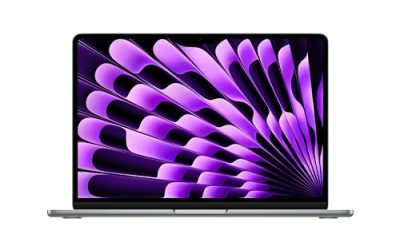
Apple MacBook Air M2 16GB
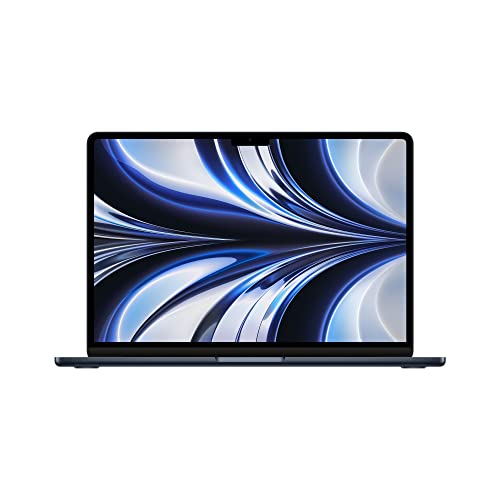
The MacBook Air M2 is the light travel pick, a 2.7 lb laptop that slips into a camera bag without adding noticeable weight and edits all day without a fan. Its 13.6-inch Liquid Retina display reaches 500 nits and covers the P3 wide colour range, so colours stay true on the road. The Apple M2 chip, with an 8-core CPU and up to a 10-core GPU, handles raw files smoothly, 16GB of unified memory keeps large catalogues responsive, and 256GB of SSD storage holds the trip. Battery life reaches up to 18 hours, and the backlit keyboard and 1080p FaceTime HD camera cover evening client calls.
Specs
- Apple M2 chip, 8-core CPU, up to 10-core GPU
- 16GB unified memory
- 256GB SSD storage
- 13.6-inch Liquid Retina display, 500 nits, P3 wide colour
- Backlit keyboard, 1080p FaceTime HD camera
- Up to 18 hours of battery life
- Fanless
- 2.7 lb
Best for: A photographer who wants the lightest laptop with a colour-accurate screen and a very long battery.
Watch out for: The 256GB drive fills fast with raw files, so plan on external storage for a long trip.
Lenovo Yoga Slim 7x
The Yoga Slim 7x is the bright-screen pick, built around a 14.5-inch 3K OLED touchscreen that reaches 1000 nits, so edits stay visible even in strong daylight. OLED colours run deep and rich, which helps when judging skin tones and landscapes on the road, and the touchscreen lets you zoom and adjust directly on the image. The Snapdragon X Elite processor, 16GB of memory and a 1TB SSD give room for a whole trip of raw files, while the 70Wh battery keeps the machine running through a long editing evening. At 2.82 pounds it stays light in the bag, and Windows 11 keeps the familiar editing workflow intact.
Specs
- Snapdragon X Elite X1E-78-100 processor
- 16GB memory
- 1TB SSD
- 14.5-inch 3K OLED touchscreen, 1000 nits
- 70Wh battery
- 2.82 pounds
- Windows 11
Best for: A photographer who edits outdoors and needs a very bright OLED screen.
Watch out for: Snapdragon runs Windows on ARM, so confirm your photo software is compatible before buying.
HP Envy x360 14
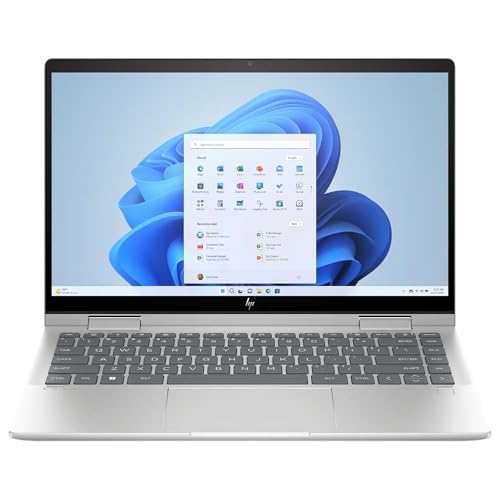
The Envy x360 14 is the flexible pick, a 2-in-1 that folds flat for client reviews or sketching edits on screen. Its 14-inch Full HD IPS touchscreen shows colours cleanly for edits on the road, and the Intel Core 5 120U processor, with 10 cores reaching 5.0GHz, keeps editing software responsive. The 512GB SSD holds much of a trip, 8GB of DDR4 memory covers everyday edits, and Wi-Fi 6E keeps uploads and backups moving in hotels and cafes. A fingerprint reader, an HP True Vision 5MP camera with privacy shutter and Windows 11 Home round out a machine that works as hard on the road as at the desk.
Specs
- Intel Core 5 120U, 10 cores, up to 5.0GHz
- 8GB DDR4 memory
- 512GB SSD
- 14-inch Full HD IPS touchscreen
- Fingerprint reader
- HP True Vision 5MP camera with privacy shutter
- Wi-Fi 6E
- 3.35 pounds
- Windows 11 Home
Best for: A photographer who wants a 2-in-1 that folds flat for reviewing images with clients.
Watch out for: The 8GB of memory is the lightest in this guide, so very large catalogues may feel slower than on the 16GB machines.
ASUS ProArt P16
The ProArt P16 is the heavy-editing pick, a 16-inch machine built for photographers who retouch, stitch and export large files on the road. Its 16-inch 4K OLED touchscreen shows fine detail and rich colour, while the AMD Ryzen AI 9 HX 370 processor and the NVIDIA GeForce RTX 4060 graphics card power through demanding edits and exports. The 32GB of DDR5 memory holds the largest catalogues without slowing down, and the 2TB SSD gives room for a whole season of raw files with no external drive in the bag. Windows 11 ties it together, and the larger screen makes long editing evenings far more comfortable than a 13-inch panel.
Specs
- AMD Ryzen AI 9 HX 370 processor
- NVIDIA GeForce RTX 4060 graphics
- 32GB DDR5 memory
- 2TB SSD
- 16-inch 4K OLED touchscreen
- Windows 11
Best for: A photographer who edits and exports large files on the road and needs the most power.
Watch out for: The 16-inch screen and the powerful hardware make it the largest and heaviest machine in this guide.
Which One Fits Your Situation
You travel light and edit in cafes and lodges
Pick the Apple MacBook Air M2. At 2.7 lb with up to 18 hours of battery, it disappears into the camera bag and edits all day without a charger. The P3 Liquid Retina display keeps colours true, the fanless design stays silent in quiet rooms, and the 16GB of memory handles large catalogues smoothly on the road.
You shoot outdoors in bright light
Pick the Lenovo Yoga Slim 7x. Its 14.5-inch 3K OLED touchscreen reaches 1000 nits, so the screen stays readable in sunshine where other panels wash out. The 1TB SSD holds a whole trip of raw files, the 70Wh battery lasts through a long evening, and the light 2.82-pound body keeps the bag manageable on the trail.
You review images with clients on the road
Pick the HP Envy x360 14. The 2-in-1 design folds flat so a client can hold the screen like a portfolio, the touchscreen lets you zoom straight into the detail, and the fingerprint reader and privacy shutter keep the machine secure between meetings. Wi-Fi 6E keeps cloud backups moving in hotels and cafes.
You retouch and export large files away from home
Pick the ASUS ProArt P16. The Ryzen AI 9 processor and RTX 4060 graphics power through heavy retouching and exports, 32GB of memory holds the largest catalogues, and the 2TB SSD stores a whole season of raw files. The 16-inch 4K OLED touchscreen makes long editing evenings far more comfortable than a small panel.
Common Mistakes
- Choosing a laptop for its processor and ignoring the screen, then finding edits made on the road look wrong back home.
- Buying a machine with too little storage, so raw files fill the drive halfway through the trip.
- Forgetting to check that the editing software runs on the processor, especially on ARM-based machines.
- Carrying a heavy laptop every day and leaving it in the hotel because the bag is too much to carry.
- Skipping the evening backup, and losing a day of images to a stolen bag or a failed drive.
Frequently Asked Questions
How light should a travel photography laptop be?
Aim for under three pounds, since the laptop shares a bag with a camera, lenses and a charger, and every ounce shows on a long day. A 2.7-pound machine feels very different from a four-pound one after eight hours walking. If the laptop outweighs the camera kit, it will spend more time in the hotel than in the field.
Is an OLED screen better for photo editing?
OLED screens show deep blacks and rich colours, which helps when judging tones and detail on the road. A P3 wide colour display is also a strong choice, and either beats a basic panel for editing confidence. Whichever you choose, check the brightness too, since a dim screen is hard to read outdoors whatever its colour quality.
How much storage does a travel photographer need?
A 1TB drive covers most trips comfortably, while 256GB fills fast with raw files and forces constant transfers to external drives. Photographers who shoot a lot each day should look for 1TB or 2TB, and carry a portable drive for the evening backup in any case. Storage is cheaper to buy now than to add on the road.
Can a fanless laptop handle photo editing?
Yes, a modern fanless laptop handles raw editing well, since photo software leans on the processor and memory more than on sustained graphics power. The benefit is silence in quiet rooms and one fewer moving part to fail on the road. Heavy video exports may run slower than on a fanned machine, so match the laptop to the heaviest work you do.
More from Amazon
Programs that pair well with the guide above. Offers and eligibility are set by Amazon and may change.
Free shipping on eligible items, Prime Video and more. Eligible new members can start with a free trial.
Start a Prime free trialA Prime membership for ages 18-24 with a trial period. Eligibility is set by Amazon.
See Prime for Young AdultsAudiobooks and podcasts to listen to on the go. Eligible new members can start with a free trial.
Try Audible freeAd-free music streaming. Eligible new subscribers can start with a free trial.
Try Music Unlimited freeAs an Amazon Associate we earn from qualifying purchases.