Key takeaways
- Compare travel laptops for photo editing by display, memory, storage and weight, with four Amazon listings chosen from their product titles and specs.
The real decision with a travel photo laptop is not raw speed on a desk at home. It is whether the screen shows colour honestly enough that edits made in a hotel room still look right later, whether the machine holds a full day of shooting without hunting for space, and whether it stays light enough that you actually carry it. A fast processor attached to a dull, dim panel is the wrong trade for photography, and so is a beautiful panel paired with storage that fills after two trips.


This guide is for travelling photographers, content creators who edit on the road, and remote workers whose second job is a camera bag. Every laptop below was selected from the name and specifications shown on its Amazon product page, with weight, display type, memory and storage treated as the deciding details rather than marketing claims about creativity or performance.
Quick Picks
As an Amazon Associate we earn from qualifying purchases.
| Product | Best for | Key spec from title |
|---|---|---|
| Apple MacBook Air 13-inch with M3 chip | Travellers who want the lightest full editing kit | 13.6-inch Liquid Retina Display, 256GB SSD |
| ASUS Zenbook 14 OLED with Ryzen 7 8840HS | Windows users who judge edits by the screen first | OLED display, 16GB memory, 512GB SSD |
| Dell XPS 13 AI PC with Snapdragon X Elite | Long travel days away from a charger | 13.4-inch 2.8K touchscreen, 16GB LPDDR5X |
| ASUS Zenbook 14 Q425MA with Intel Ultra 7 155H | Editors who keep large catalogues on the machine | 14-inch OLED touch, 16GB RAM, 1TB SSD |
How to Choose
Judge the display before the processor
For photo work the panel is the tool, not a decoration. An OLED or high-quality retina-style display will show shadow detail and saturated colour in a way a basic panel cannot, which matters when you decide whether a sky is actually blown out or a face is actually too red. Check the display type and resolution named in the listing title first, then think about size: a 13-inch screen saves bag space, while a 14-inch screen gives editing sliders and side-by-side comparisons more room on long editing sessions in transit.
Match memory and storage to your catalogue
Photo libraries grow in a way documents never do. A single trip can produce thousands of large files, plus previews, exports and backups, so storage fills quietly until the machine slows your whole workflow. Look at the memory and SSD figures in the listing and be honest about your habits: occasional editors who offload to external drives after each trip can live with a smaller SSD, while photographers who keep a working catalogue on the laptop for months should prioritise the larger storage options and treat anything smaller as a compromise they will feel quickly.
Weigh the whole editing kit, not just the laptop
The number that matters at an airport is the weight of everything you carry to edit: laptop, charger, card reader, cables and the bag itself. A slim 13-inch machine leaves more of your carry allowance for lenses, which is usually the better trade. Also consider how the laptop charges and connects. Fewer, more universal ports can mean carrying adapters for card readers and drives, so read the port and connectivity details on the product page and picture your actual desk setup in a rental apartment before you decide.
Decide your system before comparing models
Apple and Windows laptops in this guide are both capable editing machines, but they pull you into different software habits, file workflows and accessory ecosystems. If your editing tools, plug-ins, cloud storage and phone already lean one way, that continuity is worth more on the road than a small specification advantage the other way. Choose the system that matches the rest of your kit first, then compare displays, memory and storage inside that system. Switching platforms mid-trip, with libraries and licences to move, is a disruption few travellers actually enjoy.
The 4 Best Options
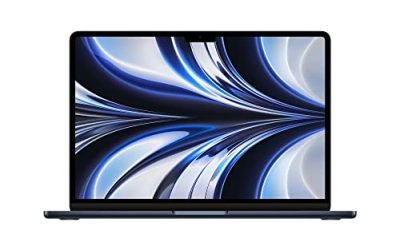
Apple MacBook Air 13-inch Laptop with M3 chip
This is the natural starting point for travellers who edit in the Apple ecosystem and want the smallest complete kit. The 13.6-inch Liquid Retina Display suits colour judgement for exports and client previews, the backlit keyboard helps in dim cabins and late rooms, and Touch ID keeps sign-ins quick when you are working in public places. It suits photographers who travel light, edit in bursts between shooting days, and value a machine that disappears into a personal item rather than demanding its own bag.
Specs
- Brand: Apple
- Chip: M3 chip, from the listing title
- Display: 13.6-inch Liquid Retina Display
- Memory: 8GB Unified Memory in the listed configuration
- Storage: 256GB SSD Storage
- Keyboard: Backlit Keyboard
- Security: Touch ID
- Colour in listing: Space Gray
Best for: Apple-ecosystem photographers who pack the lightest possible editing kit.
Watch out for: The listed configuration has 256GB SSD storage, so confirm your offload routine to external drives before relying on it for long trips.
ASIN: B0CX22ZW1T
ASUS Zenbook 14 OLED Laptop with AMD Ryzen 7 8840HS
The Zenbook makes its case through the screen. An OLED touchscreen in a 14-inch travel body is aimed squarely at editors who zoom, tap and judge colour on the panel itself, and the listed 16GB of memory with a 512GB SSD gives a working catalogue more breathing room than entry configurations. It fits Windows-based photographers who shoot a lot per trip, keep several projects open at once, and want the display, rather than the badge, to be the reason they chose the machine.
Specs
- Brand: ASUS
- Model Name: Zenbook 14
- Model Number: UM3406HA-WS74T
- Processor: AMD Ryzen 7 8840HS, from the listing title
- Memory: 16GB Memory in the listed configuration
- Storage: 512 GB SSD in the listed configuration
- Special Feature: OLED Touchscreen, Wi-Fi 6E
- Model Year: 2024
Best for: Windows photographers who put display quality ahead of every other travel concern.
Watch out for: Confirm the exact configuration on the product page, because Zenbook listings are sold in several memory and storage combinations under similar names.
ASIN: B0DFWZ77LB
Dell XPS 13 AI PC Laptop with Snapdragon X Elite
This XPS 13 is the pick for travellers whose editing happens in fragments: an hour in a lounge, twenty minutes on a train, a quick export before dinner. The listing pairs a 13.4-inch 2.8K touchscreen with 16GB of LPDDR5X memory and a 512GB SSD, and adds a fingerprint reader and backlit keyboard for working in shared spaces. It suits mobile editors who want a compact Windows machine with a sharp, touch-friendly screen and who mostly finish, rather than archive, their work while travelling.
Specs
- Brand: Dell
- Series: Dell XPS 13 AI PC Laptop
- Display: 13.4-inch Touchscreen 2.8K Display, from the listing title
- Processor: Qualcomm Snapdragon X Elite X1E-80-100, from the listing title
- Memory: 16GB LPDDR5X
- Storage: 512GB M.2 PCIe SSD
- Graphics: Qualcomm Adreno, from the listing title
- Keyboard and security: Backlit KB, Fingerprint, from the listing title
- Connectivity: WiFi 7, from the listing title
- Operating System: Win 11 Pro, from the listing title
Best for: Frequent flyers who edit in short sessions and want a compact, sharp-screen Windows laptop.
Watch out for: The Snapdragon platform means you should confirm your specific editing applications and plug-ins are supported in the versions you use before ordering.
ASIN: B0DJPYW835
ASUS Zenbook 14 Q425MA with Intel Core Ultra 7 155H
Where the first Zenbook above is the screen-first choice, this Q425MA configuration is the storage-first one. The listing names a 14-inch OLED touch display, an Intel Ultra 7 155H processor, 16GB of RAM and a 1TB SSD, which is the combination for photographers who return from a trip and keep editing the same catalogue for weeks without moving files around. It fits creators who treat the travel laptop as their main editing machine at home too, not just a temporary road companion.
Specs
- Brand: ASUS
- Model Name: Q425MA-U71TB
- Model Number: Q425MA-U71TB
- Processor: Intel Ultra 7 155H, from the listing title
- Display: 14-inch OLED Touch, from the listing title
- Memory: 16GB Ram in the listed configuration
- Storage: 1TB SSD in the listed configuration
- Operating System: Win 11, from the listing title
- Keyboard: Q US English Keyboard, from the listing title
- Model Year: 2024
Best for: Photographers who keep large catalogues on the laptop and edit the same library at home and away.
Watch out for: A 1TB internal drive still fills with multi-trip archives, so confirm your backup plan rather than treating the larger SSD as unlimited space.
ASIN: B0D5BNX474
Which One Fits Your Situation
You travel with carry-on only and shoot daily
Pick the MacBook Air 13-inch if you are in the Apple ecosystem, or the Dell XPS 13 if you are not. Both keep the editing kit small enough that camera gear keeps priority in the bag. Accept the smaller internal storage as part of the deal and build a nightly offload habit to a portable drive, because on a shooting-heavy trip the drive, not the processor, is what runs out first.
You judge every edit by the screen
Choose one of the two Zenbook 14 OLED models. The Ryzen 7 configuration suits travellers who offload regularly and want the OLED panel with a mid-size SSD, while the Q425MA configuration suits editors who keep the catalogue resident on the machine. Either way, you are paying your attention to the right component: for photo work, an honest display prevents the most expensive mistake, which is re-editing a whole set later because the travel screen flattered it.
You edit in short bursts between flights and meetings
The Dell XPS 13 fits this pattern best. Its compact body, touchscreen and fingerprint sign-in suit a workflow built from short, frequent sessions in public places, and the listed memory and storage are sized for finishing current work rather than storing years of archives. If your trips mix photography with presentations, documents and calls, this is the most natural single machine in the group to carry.
The travel laptop is also your main computer
Take the Zenbook 14 Q425MA and its 1TB SSD. A machine that only travels can survive on small storage and constant offloading, but a main computer accumulates catalogues, exports, applications and personal files all year. The larger drive and 16GB of memory in this listing are the combination that still feels comfortable in month six, long after the novelty of a light bag has worn off.
Common Mistakes
- Buying on processor headlines and ignoring the display, then discovering on the road that you cannot trust the colours you are editing.
- Choosing the smallest SSD to save space in the bag, then filling it mid-trip and deleting working files under pressure.
- Comparing laptop weight alone and forgetting the charger, reader, cables and drives that complete the real editing kit.
- Switching between Apple and Windows without checking that your editing software, licences and plug-ins move with you.
- Assuming every listing with a familiar model name has the same memory and storage, instead of reading the exact configuration on the product page.
Frequently Asked Questions
How much storage does a travel photo laptop really need?
It depends on how long you keep files on the machine. Travellers who offload to an external drive after every trip can work comfortably with the smaller SSD configurations listed here. Photographers who keep a working catalogue on the laptop for months should choose the largest SSD they can, because photo libraries grow faster than almost any other kind of personal file collection.
Is a 13-inch screen big enough for photo editing?
For travel editing, yes, provided the panel quality is good. A sharp 13-inch display handles culling, exposure and colour decisions well, especially when you zoom into detail rather than judging everything at full-frame size. Many travelling photographers do their final, most critical checks on a larger screen at home and use the travel laptop for selection, first edits and exports while the trip is still fresh.
Should I choose OLED for editing while travelling?
An OLED panel is a strong choice when colour and contrast judgement matter, because it shows deep blacks and saturated colour clearly in varied lighting. The two Zenbook listings here use OLED touch displays. Whichever panel you choose, keep brightness consistent when you edit and avoid judging colour in harsh direct sunlight, because viewing conditions change your decisions as much as the screen itself does.
Does the operating system matter for a photo laptop?
Yes, mostly through your existing workflow. Your editing applications, plug-ins, cloud backups and phone all connect more smoothly inside one ecosystem. Both systems in this guide can edit photos well, so the practical question is continuity: pick the platform that matches the tools and devices you already own, then compare display, memory and storage among the laptops that run it.
More from Amazon
Programs that pair well with the guide above. Offers and eligibility are set by Amazon and may change.
Free shipping on eligible items, Prime Video and more. Eligible new members can start with a free trial.
Start a Prime free trialA Prime membership for ages 18-24 with a trial period. Eligibility is set by Amazon.
See Prime for Young AdultsAudiobooks and podcasts to listen to on the go. Eligible new members can start with a free trial.
Try Audible freeAd-free music streaming. Eligible new subscribers can start with a free trial.
Try Music Unlimited freeAs an Amazon Associate we earn from qualifying purchases.