Key takeaways
- Compare five portable monitors for travel by weight, size and ports, with USB-C compatibility checks and picks for light bags and hotel desks.
- Top Pick: Lenovo ThinkVision M14
- Runner-up: ViewSonic VA1655
- Also consider: KYY K3 Portable Monitor
Working from a hotel room, a rental apartment, or a coworking desk usually means working on one small laptop screen. A portable monitor fixes that without adding a desk setup you have to leave behind: it slides into the same bag as your laptop, runs from a single cable on most models, and turns a cramped table into a two-screen workspace in about a minute.
The five picks below were chosen for travel first. Weight, thickness, and how the screen stands up on an unfamiliar desk matter as much as the panel itself, so each pick is judged on how it packs, how it connects, and what kind of trip it suits, from a light carry-on work trip to a long stay where a bigger, better screen earns its space.
As an Amazon Associate, we earn from qualifying purchases.
Quick Answer
For most travelers, a 15.6-inch USB-C portable monitor is the sweet spot: the ViewSonic VA1655 pairs a light frame with a stand and case, while the Lenovo ThinkVision M14 is the lightest pick here. The ASUS ZenScreen OLED suits color work, the KYY K3 keeps things simple and slim, and the ARZOPA E1 adds a second folding screen.
Lenovo ThinkVision M14

The ThinkVision M14 is the pick for travelers who count every ounce. At 14 inches and about 1.3 pounds, it is noticeably smaller and lighter than the 15.6-inch models, so it slips into a laptop sleeve or a slim daypack without changing how the bag carries. The trade-off is screen space: a 14-inch panel gives you less room for side-by-side windows, which suits email, documents, chat, and reference material better than wide spreadsheets.
Connectivity is deliberately simple. There is no HDMI input, so your laptop, tablet, or phone must send video over USB-C with DisplayPort Alt Mode. In return you get two USB-C ports and a one-cable setup at the desk, with a protective sleeve included for the bag. The 300-nit IPS panel is the brightest of the standard LCD picks here, which helps in bright hotel rooms and airport lounges.
Specs
- Screen: 14-inch IPS, 1920 x 1080 Full HD
- Brightness: 300 nits, per the listing
- Response time: 6 ms, per the listing
- Ports: 2 USB-C ports; no HDMI input
- Weight: about 1.3 pounds
- In the box: monitor, stand, sleeve, USB-C cable
- Warranty: 1 year, per the listing
ViewSonic VA1655

The VA1655 is the straightforward mainstream pick: a 15.6-inch screen from an established display brand, with both USB-C and Mini HDMI inputs so it works with older laptops, game consoles, and phones that cannot send video over USB-C. That flexibility matters on mixed trips where the second screen might serve work by day and a console or streaming stick at night.
At 1.5 pounds and 0.7 inches thick it is still an easy carry, and the details are travel-friendly: a built-in stand rather than a floppy cover, a protective case in the box, and built-in speakers so you are not relying on laptop audio for calls. The USB-C connection supports 60W two-way power per the listing, which keeps cable clutter down at small desks. Brightness is a modest 250 nits, so it is better suited to indoor work than a sunlit balcony.
Specs
- Screen: 15.6-inch IPS, 1920 x 1080 Full HD
- Refresh rate: 60 Hz
- Brightness: 250 cd/m2, per the listing
- Ports: USB-C with 60W two-way power, Mini HDMI
- Weight: 1.5 pounds; 0.7 inches thick
- Extras: built-in stand, protective case, speakers
- Warranty: 3-year limited warranty, per the listing
KYY K3 Portable Monitor
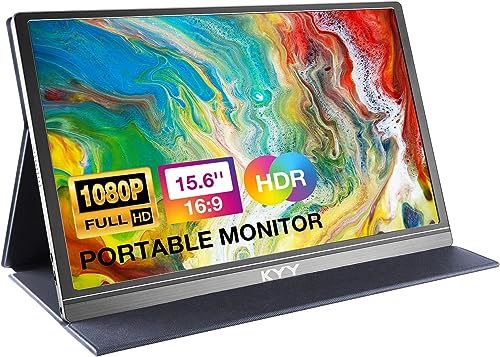
The KYY K3 is the slim, simple option for travelers who want a second screen for documents, browsing, and video without paying for premium panel features. It measures just 0.35 inches thick and weighs 1.7 pounds, and the included smart cover protects the screen in the bag and folds into a stand when you set up.
You get both USB-C and Mini HDMI connectivity, built-in speakers, and HDR support per the listing title, so it covers laptops, phones, and consoles with one device. The compromises are the ones you would expect at this end of the range: a cover-style stand is less rigid than a built-in kickstand on uneven tables, and the listing does not state a brightness figure, so check the listing if you often work in very bright rooms.
Specs
- Screen: 15.6-inch IPS, 1920 x 1080 Full HD
- Ports: USB-C and Mini HDMI, per the listing
- Weight: 1.7 pounds; 0.35 inches thick
- Stand: smart cover that doubles as a stand
- Extras: built-in speakers, HDR support per the listing
- Brightness: confirm on the listing
- Model: K3
ASUS ZenScreen OLED MQ16AHE

The ZenScreen OLED MQ16AHE is the pick for travelers whose work depends on how the screen looks: photo editing, video, and design review on the road. Its OLED panel delivers the deep blacks and wide color coverage the LCD models cannot match, with 100 percent DCI-P3 coverage and HDR-10 support per the listing, plus a fast 1 ms response that also makes it the most game-friendly screen here.
The hardware is built for life on the road rather than a fixed desk. A 360-degree kickstand handles tight and awkward surfaces, a proximity sensor dims the screen when you step away, and you get both Mini HDMI and two USB-C ports, so it connects to laptops, phones, and consoles alike. ASUS backs it with a 3-year warranty per the listing. It is the largest panel in this roundup at 16 inches, so check your bag’s laptop compartment before choosing it.
Specs
- Screen: 16-inch OLED, 1920 x 1080 Full HD
- Color: 100 percent DCI-P3, HDR-10, per the listing
- Response time: 1 ms, per the listing
- Ports: Mini HDMI and 2 USB-C ports
- Stand: 360-degree kickstand
- Extras: proximity sensor, Eye Care features
- Warranty: 3 years, per the listing
- Model: MQ16AHE
ARZOPA E1 Dual Portable Monitor

The ARZOPA E1 takes a different approach: instead of one screen, it folds out into two stacked 15.6-inch panels, giving you a triple-display setup with your laptop from a single piece of luggage. For travelers who live in spreadsheets, code, trading dashboards, or long documents and stay in one place for days at a time, that extra vertical screen is genuinely useful rather than a novelty.
Each panel is a Full HD IPS display with full sRGB coverage per the listing, a matte finish, and an adjustable kickstand, and the unit connects over USB-C and HDMI with built-in speakers. The obvious trade-off is bulk: two panels, a hinge, and a stand add weight and thickness compared with any single-screen pick here, and the listing does not state a total weight, so confirm on the listing if you pack light. This is a base-camp tool for long stays, not a carry-on minimalist’s screen.
Specs
- Screen: dual 15.6-inch IPS panels, 1920 x 1080 Full HD each
- Color: 100 percent sRGB, per the listing
- Refresh rate: 60 Hz
- Brightness: 250 nits, per the listing
- Ports: USB-C and HDMI
- Extras: foldable stacked design, adjustable kickstand, built-in speakers
- Weight: confirm on the listing
- Model: E1; 2-year warranty, per the listing
How to Choose
Start with your laptop’s ports, because they decide what you can use. Most portable monitors need a USB-C port with DisplayPort Alt Mode for one-cable video; a USB-C port that only charges or moves data will not work. If your laptop is older, or you also want to connect a console or camera, pick a model with Mini HDMI as well, like the VA1655, the K3, or the ASUS OLED.
Next, weigh size against space. A 14-inch screen like the ThinkVision M14 is the easiest carry and fits smaller bags, while 15.6 inches matches most laptops and feels familiar for all-day work. The 16-inch ASUS and the dual-screen ARZOPA only make sense if your bag has room and your work actually uses the extra space.
Then check the stand and the power story. A built-in kickstand or rigid stand sets up faster and wobbles less than a folding cover. Most of these screens draw power from the laptop over USB-C, which drains the laptop battery faster; models with two-way power or a second USB-C port let you plug in a charger and pass power through during long sessions. Finally, confirm the sleeve or case situation, because the screen will spend most of its life pressed against other gear in your bag.
Who Should Skip
Skip a portable monitor entirely if your trips are short and your laptop screen already handles your workload; the extra weight earns its place only when you regularly work with two windows side by side. Skip USB-C-only models like the ThinkVision M14 if your laptop lacks DisplayPort Alt Mode and you do not want to replace the laptop. Skip the ARZOPA E1 if you pack carry-on only and change hotels every night, and skip the ASUS OLED if your work is mostly text and email, where its color advantages will never show. If you mainly want a bigger screen for movies in bed, a tablet you already own is probably the better travel companion.
FAQ
Will a portable monitor work with my laptop?
It will if your laptop has a USB-C port that supports DisplayPort Alt Mode, which most recent laptops do, or an HDMI output you can pair with a Mini HDMI input on the monitor. Check your laptop’s specifications for the port’s video support before ordering, because a charging-only USB-C port cannot send a picture.
Do portable monitors need their own power supply?
Most draw power from the laptop over the same USB-C cable that carries video, so no separate adapter is required. That convenience costs laptop battery life, so for long sessions look for a monitor with a second USB-C port or two-way power so a charger can feed the setup while you work.
What size portable monitor is best for travel?
A 15.6-inch model matches most laptops and balances screen space with packability, which is why it is the most common travel size. Choose 14 inches if weight and bag space are your top concerns, and only step up to 16 inches or a dual-screen model if your work clearly needs the extra room.
Can I use a portable monitor with a phone or game console?
Yes, with the right inputs. Phones with USB-C video output can drive most of these screens, and consoles connect through the Mini HDMI port on models like the VA1655, the KYY K3, and the ASUS OLED. The USB-C-only ThinkVision M14 cannot take an HDMI signal, so it is a laptop and tablet screen only.
Final Verdict
For most working travelers, the ViewSonic VA1655 is the balanced choice: light, flexible on inputs, and backed by a longer warranty. Pack the Lenovo ThinkVision M14 when every ounce matters, choose the ASUS ZenScreen OLED when image quality is the work, keep the KYY K3 for a slim and simple setup, and take the ARZOPA E1 when a long stay justifies two extra screens. Match the monitor to your laptop’s ports first, and any of these five will turn a hotel desk into a real workspace.
More from Amazon
Programs that pair well with the guide above. Offers and eligibility are set by Amazon and may change.
Free shipping on eligible items, Prime Video and more. Eligible new members can start with a free trial.
Start a Prime free trialA Prime membership for ages 18-24 with a trial period. Eligibility is set by Amazon.
See Prime for Young AdultsAudiobooks and podcasts to listen to on the go. Eligible new members can start with a free trial.
Try Audible freeAd-free music streaming. Eligible new subscribers can start with a free trial.
Try Music Unlimited freeAs an Amazon Associate we earn from qualifying purchases.